Groundhog Freebie and other goodies
-
In case you are in need of some last-minute Groundhog Day ideas...
Here is a FREEBIE!
These digital activities are a fun way to practice skills.
Are...
Holidays Around the World Plans 2019
-
With 20 countries to to pick from, you'll never get bored! Here are the
example plans for 2019. As always, my advice is GET STARTED EARLY! There
are a lo...
Cubby Names Tip
-
Getting your classroom ready takes a lot of patience and preparation. Tip:
Use a index card or post-it note to make sure each label is in the same
spo...
Meet the Teacher Freebies
-
12 years later, and I still get butterflies on Meet the Teacher night. I
love meeting a new group, but its such a busy night trying to meet all my
new ...
West Fork Park | Green Township, OH | Cincinnati
-
The weather yesterday was *perfect*. Not a cloud in the sky, no humidity,
mid 70s with a light breeze. A little too chilly for the pool, I decided to
tak...
Alphapalooza 2 Phonemic Awareness & Phonics Fun!
-
“The two best predictors of early reading success are alphabet recognition
and phonemic awareness.”
-Marilyn Jager Adams
We spend a lot of time working ...
Hey Teachers....It's OKAY.
-
*Yes YOU.*
The one whose weary body hits snooze 5 times before hurriedly rushing out
the door to get to school on time.
I'm talking to you.
The perm...
#2 pencils
-
Got this idea from a friend who posted a picture! I think they are perfect
#2 testing pencils! Haha! Sending as a gift to the upper grades.
Sorting Ideas
-
*We started sorting in math last week. *
*There are SO many great ideas and resources out there for teaching
kindergarten students about sorting...*
*Her...
How Teachers Feel After the First Day of School
-
Today was my 15th first day of teaching. I think it's a little like
childbirth. We have to forget how much work it really is or we may not
come back to ...
Ruby Bridges: One Week Wonder
-
This marks week number two of our biography unit, and we have been busy
learning with my *Ruby Bridges: One Week Wonder* study! We read *The Story
of Ruby ...
One Year!
-
It's been almost a WHOLE year since I last blogged. May things have changed
in this past year. I am no longer a First grade teacher. This will be my
2nd ye...
Math Tool Kit Freebie
-
Hey my peeps! I hope your summer has been fantastic!! I have two more
weeks, then it’s back to the grind for me.
Hop on over to Blog Hoppin’ to grab a ...
Gingerbread Math
-
This week we are doing all things Gingerbread!! We have been doing tons of
the activities in my Gingerbread Fun literacy unit. My students have loved
ever...
Australian Animals
-
Hi everyone,
We're settling in to our new life in Australia........I have a NEW
Kindergarten teaching position that I will start next year (which is in...
Pinteresting Find-- Noise Management
-
So I just saw this pinned from Deanna Jump and Mrs Carroll (The First Grade
Parade) and I couldn't NOT share this IMMEDIATELY. Things like this excite
me a...
Well, Hello!
-
Long time, no see! I am happy to announce that I am back into blogging,
after being away for a year. Wow! I switched grade levels last year and
blogging wa...
"Find the Difference" Math Flower Garden
-
To make these lovely flowers, the students made two colors of petals (one
color more than the other) and wrote a math subtraction sentence on a leaf
to...
First WAS Fab...Second will be Super!
-
Thanks to all followers of this BLOG. I will be moving to second grade and
will no longer post to this BLOG. I will, however, leave it active for
viewing a...
This site, Wolfram Alpha, gives you the power to not just ask a question and receive webpages, but to ask a question and receive the calculated response.
As in, it literally could do your math homework for you! Or show you the steps if you get stuck. :) But it does any calculation, not just math.
Hi friends! I have spent the last three days setting up and presenting and attending our wonderful district Technology Conference! It's been exciting and I have some great things to share with you.
Would you like to control your desktop computer with your Ipad- while viewing your computer screen on your ipad? *Since writing this post, I have discovered a better app! Check out Splashtop Whiteboard, currently $9.99, normally $19.99! This app gives you the functions of a whiteboard!!!!
I'm asking you if you would essentially like to turn your Ipad into a Mobi Interwrite... for free. You can even buy a stylist and WRITE ON YOUR SCREEN!!!!!!
Yes, bloggy friends, it's true! In order to do this you will need a Virtual Network Computing, or VNC app.
This video is just a demonstration of the technology. This is the paid version of an app called "Screens" which does the same thing as Mocha Lite.
I just installed this version and IT WORKS AND IT IS SOOOOO COOL! Mocha VNC Lite App Cost: $0!!!! Using your iPhone or iPad, you can connect to a Windows PC or Mac OS X and see the files, programs, and resources exactly as you would if you were sitting at your desk, just on a smaller screen. "VNC" $0 Cons: Hard to set up without watching a tutorial, but here's the video tutorial that gives simples steps to follow! RDP $0- Same as VNC, but works on a PC is how I understood it.
Here are the directions for how to set up the Mocha VNC Lite to connect to a Mac:
Directions for controlling a PC: 1. Go buy a Mac. Seriously. Watch this video, it has 17,0000,0000 steps of silly windows things. Watch the Mac video. It takes 2 secs and 1/198 the amount of steps. Alright, I'm off my soapbox.
Here's your video:
I've so excited right now I can't even tell you about it. Basically I just created a Mobi FOR FREE!!!!!! I don't have an interactive whiteboard, but now I can control the computer and see the screen on the Ipad at the same time. You can also do this with an iphone or itouch.
Here is my first Jaycut (free online editing software) movie using a green screen. To learn more, visit my post about publishing movies. Again, this is my first try with Jaycut- I will work on the whole "disembodied head" look....
I shot this by sitting in front of a green towel held up by an empty TV box placed on my ironboard. I actually filmed this one with my mac. This is a very rough first copy, but I love the technology.
I'm including a link to the fancy-pants set up from Amazon that I would loooove to get for my classroom. You could also paint a wall green if they let you! This would eliminate the green spots you see in my video. But as a first attempt with a towel as the backdrop, I think it's not too shabby!
Here is a virtual tour of my ocean-themed classroom. I know some of the pics are already on my blog, but I wanted to compile everything ocean-related into one post. There are still many, many things that I want to change. I'm open to your ideas for (nice) constructive criticism. :)
I can't find an updated pic of my calendar. It looks completely different now! I use JMeacham for inspiration.
This is my parent communication binder, or S.E.A. binders. Again, JMeacham rocks at this and has all of it outlined for you to download if you need it.
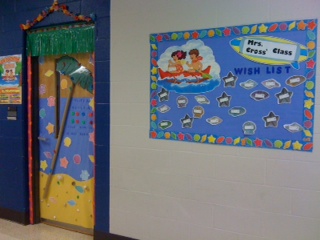
The wishlist in the hallway. The 1 set of shells are photocopied in black & white. I do touchups with markers and then add an avery label with a wishlist item.
To create this door, combine an ocean theme packaged resource & paint.
I really love my ocean paper on the word wall. I think it adds a lot to the room. This is before school started, so it is empty!
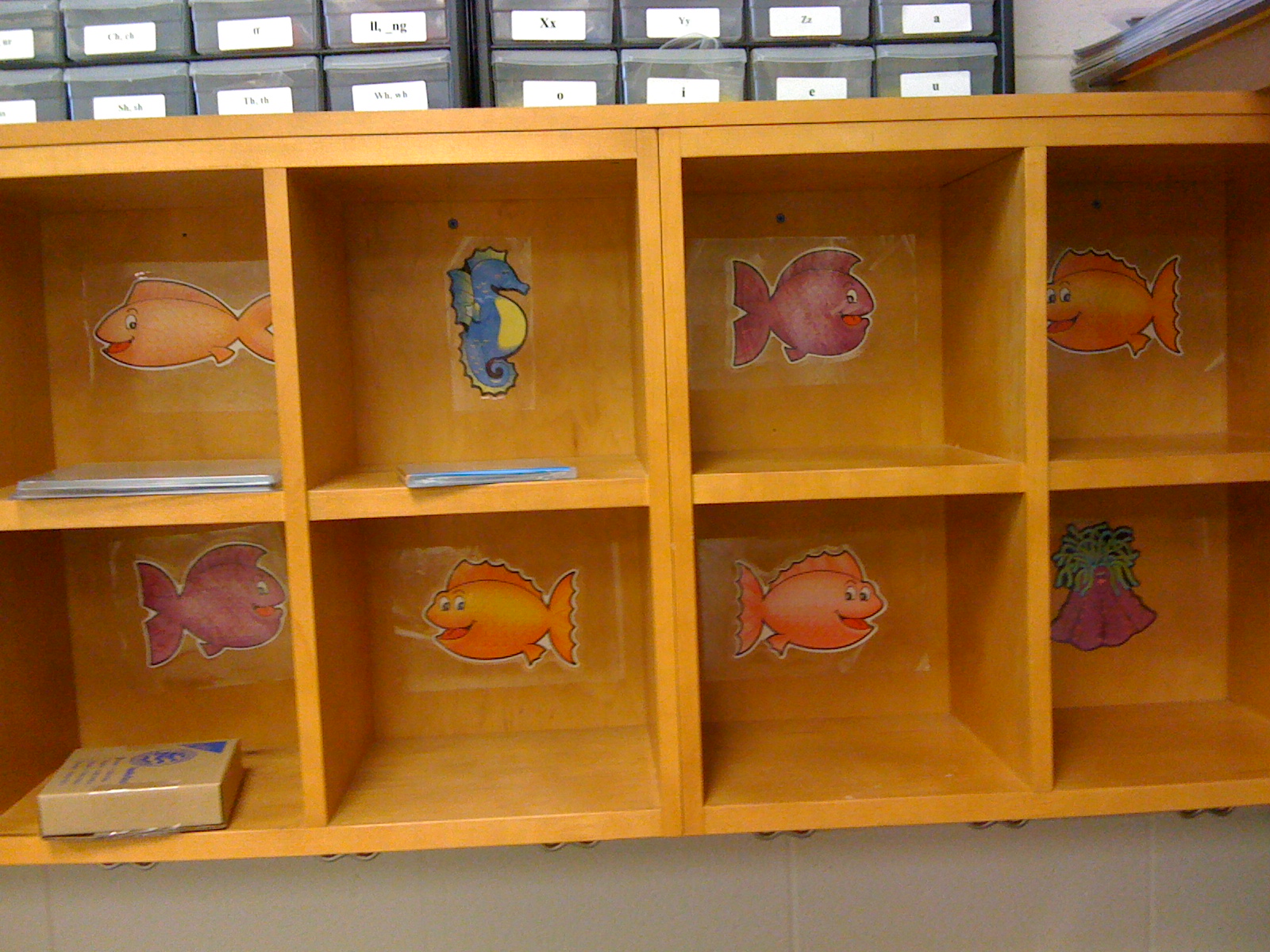
For the cubbies, I added these little guys after laminating them. Cover them with contact paper to make them stick. Last, add an avery label with each student's name to identify which cubby is theirs. You can even add another label on top the next year! They stayed really well.
Modified shower curtain from Walmart keeps my clutter at bay
My closet area. See the ocean-ish colors behind the fish in the window? It's an old umbrella cloth. The dolphin is a Batik (silk screen dying process) I did in high school. Note my old colored card management system- check out my post on classroom management for different ways to have positive interactions.
Outside the wishlist board can be converted to show off student work.
Entryway- these are "sole fish" aka crayon rubbings of the bottom of their shoe decorated to look like a fish. We also do a writing activity with this.
Finally the arrival of my Ocean Canopy from Oriental Trading. You can get your own for $50- they also come in jungle theme & a circus (primary colors) theme. We've added a fun assortment of pillows and beanbags. It makes for quite a comfy reading nook!
Of course you have to have an aquarium! I moved it from this spot, but when we first got it that was the only place I could fit it in.
My canopy has moved to the back of the room this year. Also, check out the Palm tree beach paper above the cubbies. I really like that. I also added grass skirt strips from the dollar store above all door ways- you can see it in the right side of this pic above the closet door. The kiddos on the left are sitting at a kidney-shaped table doing guided reading with me.
Chicka Chicka BOOM BOOM Look Who's In Our Room!
I love our Chicka Chicka Boom Boom Classroom Door. We don't get our class lists until the day before the students arrive (yikes!) so I added names later. I also took their photographs and put them on the shells above their names. I really liked covering the door frame to make it pop. I took long skinny strips of pink butcher paper and then covered them with lots of orange paper dots. Add the grass skirt strip from dollar store and you are all set!
My "vacation hat" is very useful. It's a visual to remind the other students that I'm working in small groups- on "vacation". Whenever the hat is on, they can't talk to me. They have to find a friend or use one of our problem solving skills to figure it out on their own until I can meet with them again. I also have a "computer expert" that wears a special necklace who they can go to for tech help. You could also include a "supply manager".
Ok friends, we had such a great time with the bulletin boards that I really want to see what your doors look like!
I have to admit, I LOVE doing door decorations more than a bulletin board.
Here are a mine:
To create this door, I purchased the ocean themed set at Parent Teacher store. Next, take some paint and add in details. My favorite part of this door is the surfer boy & wave, which is a combo of the plastic image and paint.
Straight on view
Ahhh Fall! The table is set up for open house night.
Sally, our class scarecrow purchased at Walmart for under $10. Don't make fun of my pumpkins. Yes, I do realize that most of them are actually shaped more like apples. ;)
Christmas time! My amazing room mom loaned me a half-tree one year. I miss it!
The cartoon characters are based off of the "December" teacher idea book. I sketched them out and painted them & then laminated them. An easy way to duplicate this would be to create a transparency on the copier and then use your overhead to trace the image onto a larger piece of butcher paper. Another great resource for characters are those board for preschools with cartoon characters in them. Mom my had an entire stash of those for the sole purpose of decorating the classroom!
Kind of boring... BUT this is the first pic with my ocean canopy, which I LOVE!
Chicka Chicka Boom Boom... Look Who's In Our Room! I included pics of the kids and names on the shells, but I can't find a picture of that anywhere!
Wish list tip: See those colored shells on the door? I put a few of them on a piece of paper, copied them in black and white. Next, I sketched over them in colored pencil. Last, throw your wishlist on Avery labels, print, and stick! Now you can tape the shells onto a wishlist board and just have parents pull them off.
Bucket Fillers
For the past year I have wanted to implement the Bucket Filler system into my classroom. I will start in the fall, but I need some help. First off, for those of you who are not familiar with "bucket fillers", the premise is basically that everyone carries around an invisible bucket and it is based on the book "Have You Filled A Bucket Today?" (see below). When we say and do nice things for others, we "fill their buckets". People can also be "bucket dippers" by saying or doing hurtful things. I think this is a great concept for 1st graders, and I like that you can positively reward them.
Here are some great sites with more ideas and free stuff that can help you get this up and going! Mrs. Diller has great printables and writes extensively on how she uses this in her classroom. Beth Newingham's Bucket Fillers Official Bucket Fillers Site
***Here is my question: What do you use in your room? I'm thinking about getting the mini buckets and allowing the students to write positive messages to one another on slips of paper and then place them in the buckets. I want to have one big bucket that I fill with pompoms as the class receives compliments or behaves well.
Classroom Economy
I also want to have a classroom economy. This involves each student having something on their desk- possibly a notepad (maybe just a piece of paper with contact paper over it that I could write on with dry erase marker) that has a "Credit" and "Debit" side. If they are caught being good, working quietly, quickly following instructions, helping a friend, etc. then you would simply walk by and give them a tally under the credit side. The opposite is true for bad behavior- you mark a debit. At the end of the week they add up each side, and subtract it out (hello math skills!). Every so often you would open up the bank, have a "banker" student give them play money and allow them to purchase items at the class store (hello money skills!!). At the upper elementary levels, you can even have a class "economist" who tallies which items are in high and low demand, run sales based on this & create graphs. Love the math skills that are covered here! Beth Newingham is the guru of classroom economies, and she explains it much better with lots of pics. Check it out here! In Beth's class, the students even created innovative products that could be sold in the class store.
Teams
Next, I want to have teams. Each table will pick the sea creature mascot of their choice (we have an ocean theme in my class). I will write all the teams on the board and give them points (tallies) for doing excellent group work.
However, here is my problem: how do you keep this up? What incentives do you give to these kids? I'm thinking as a group they might could earn some extra technology time- computers/ipad/ipod/iphone on any educational game of their choice. I think they would like that. I tried this a year ago, and I had a hard time keeping it up because I started with big rewards early on. I learned. :) Also, I like the kid drawings, but overall this kind of looks messy, so I will definitely be cleaning this up a bit.
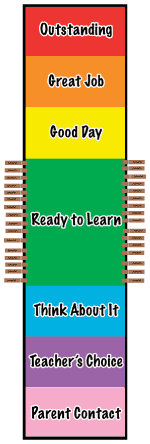
Positive Management Chart Lastly, I wanted to share this management chart, especially for all the people that have the 3 colored cards or stoplight as your current management system. In your system, where is the incentive to be good? There is no room to improve or go up. The only response is consequences to negative behavior without focusing on positive behavior. I found this jewel at New Management, and I think it is great! There is even an e-book to help you get started. This sturdy looking vinyl chart can be ordered for $20.
*Update: Ashley Nichols at The Polka Dot Patch has some fantastic free resources that go with this chart! She has a discipline policy to send home to parents as well as class rules.
So these are a few options of things that can spice up your classroom. I'm not advocating that you try it all together, but hopefully this has given you some new ideas. :) I know I will be making some changes next year!
What do you do for effective classroom management?